
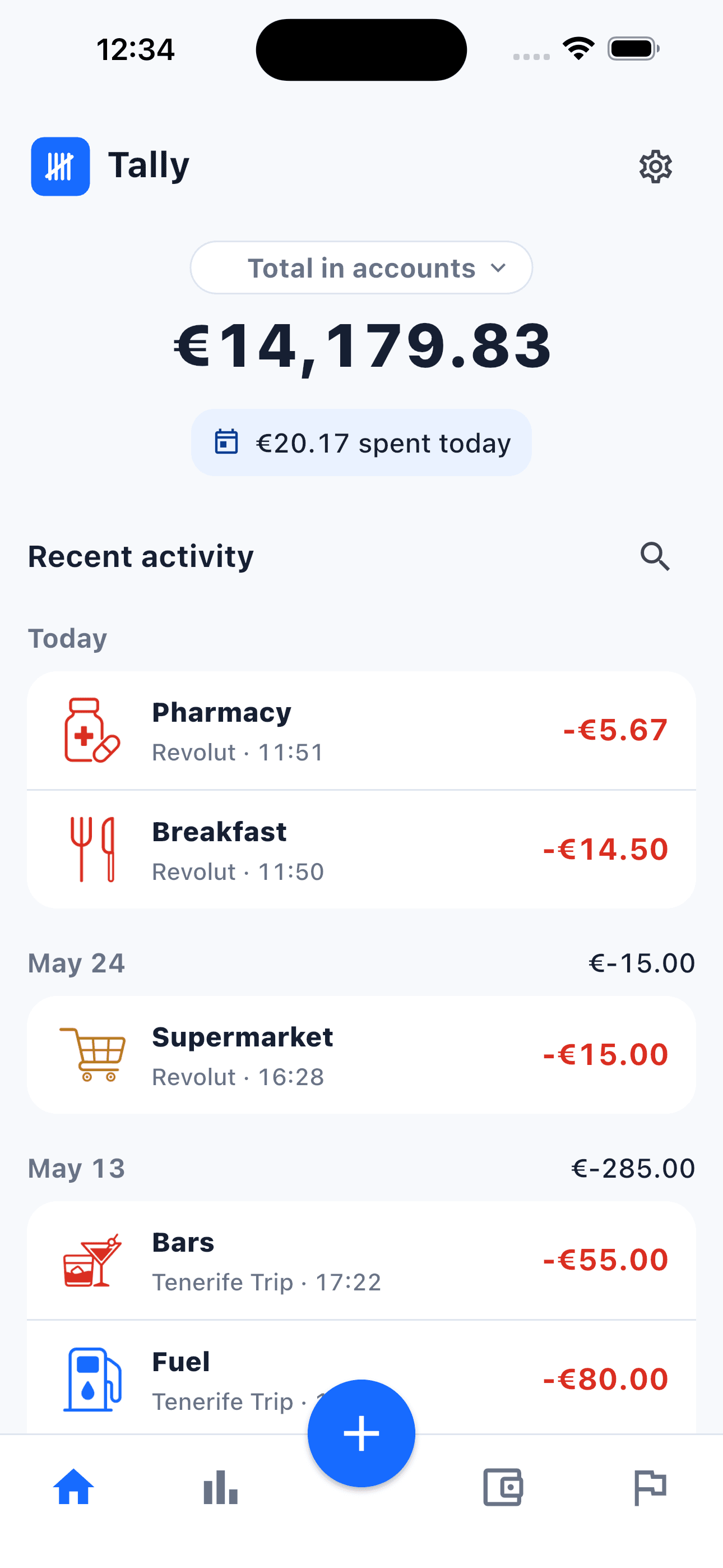
Before
- Loose spending across cash, cards, and trips.
- Receipts gone when you need to review them later.
- Apps asking for bank access before you can start.
 Tally
TallyLocal by default · share only what you choose
Tally helps you log expenses and income in seconds, organize accounts, and keep receipts without turning personal finance into a heavy dashboard.

WHAT TALLY IS
Tally is an expense tracking app for iPhone and Android designed for people who want clarity without connecting a bank account. It lets you log expenses and income manually, separate accounts, choose categories, use multiple currencies, keep receipts, and review statistics, goals, and recurring transactions. Data is stored locally by default. With Tally PRO, you can share only the accounts you choose through a link, assign permissions, and keep their transactions synchronized; functional content is encrypted on the device before upload. Receipt images remain local when sharing an account, and AI receipt analysis only runs when explicitly requested. The goal is simple: record transactions in seconds, understand spending, and stay in control without handing over bank access or filling the app with noise.
Author: Juan Carlos Rodicio. Updated: July 6, 2026.
CURRENCIES
Create accounts for cash, cards, savings, or travel. Tally supports currencies across Europe, the Americas, and more so each movement fits where it belongs.
Choose your primary currency during setup and change it later in Settings.

BEFORE · AFTER
ESSENTIALS
Tally is designed for short sessions: log, review, move on.
Add, edit, delete, and search movements by account, category, date, or concept.
Icons and colors for groceries, leisure, transport, income, and more.
Attach ticket photos from camera or gallery. AI analysis only runs when you ask.
Review category breakdowns, comparisons, trends, and goal progress.
Save periodic expenses or income and review what is coming next.
Share an account with other PRO users, choose who can edit, and securely synchronize its transactions.
Export data or share a local reviewable pack without uploading receipts to a remote gallery.
HOW IT WORKS
Tap +, choose expense or income, account, category, and date.
Separate accounts, currencies, categories, receipts, and goals.
See what comes in, what goes out, and where to adjust.
REVIEWS
Reviews from App Store and Google Play shared by app users.
4 jun. 2026 · Fernando Blesa · App Store
I’ve tried several apps like that, but this one is by far the best. The interface is incredibly intuitive and clean, making it super fast to log expenses on the go. It does exactly what I need without any unnecessary clutter. Highly recommended
7 jun. 2026 · Claudio VB · Google Play
Fácil de usar y muy útil. Puedes crear varias cuentas de gastos (hogar, ocio, etc.) y añadir los diferentes gastos categorizados. Hay buscador de gastos muy práctico. Puedes subir una foto de un ticket como gasto y te lee la información.
6 jun. 2026 · Ana Maria Toro Torres · Google Play
Me ha gustado mucho esta aplicación, es fácil de usar, me ayuda a controlar todos mis gastos día a día y ver dónde puedo ahorrar al tenerlo todo a la vista. Sobre todo lo mejor es que mis datos son privados.
6 jun. 2026 · J. Javier Delgado · Google Play
De las mejores aplicaciones de control de gastos. Rapidísima, limpia y sin anuncios
TRUST
Tally stores your data locally by default. If you choose to share an account, its functional content is encrypted on your device before synchronization. We do not connect banks, sell data, or use your transactions for advertising.
Read privacy policyTALLY PRO
The free version covers the basics. Tally PRO unlocks encrypted shared accounts, custom categories, event accounts, AI receipt scan, and more room for accounts and recurring items.

No. Tally works through manual entry and does not import bank movements.
Only the account you choose and the data needed to synchronize it. Functional content is encrypted on your device before upload.
Receipt images remain in the app private storage even when you share an account. An image is only sent when you tap analyze receipt.
Yes. You can download Tally from the App Store and Google Play.
No. It creates reviewable drafts when enabled with PRO; you decide whether to save them.
Add your first account, log one movement, and feel the relief of having it visible.